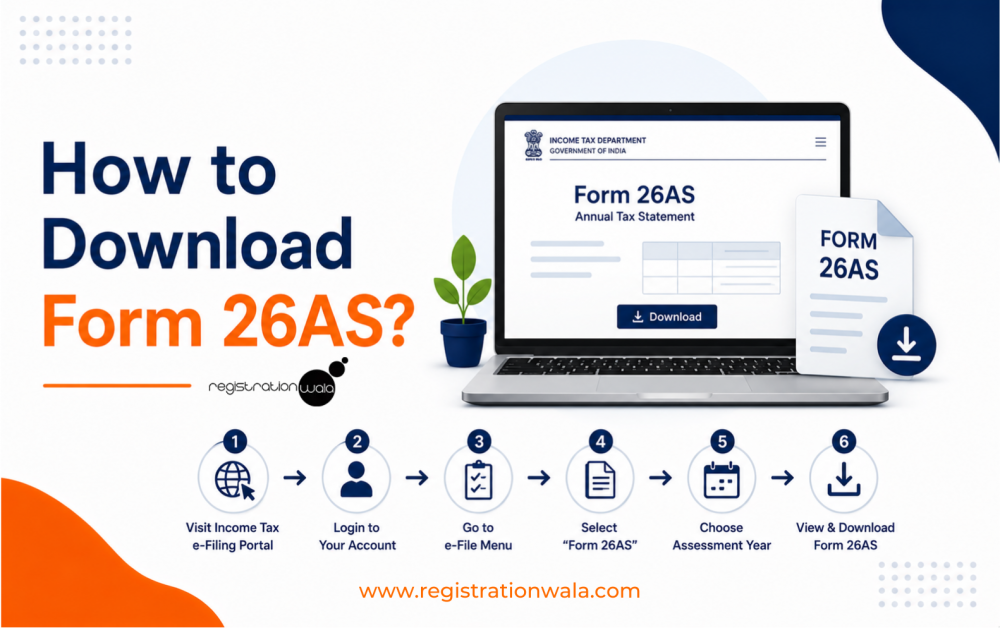
One of the most important tax forms in India is Form 26AS, which is a consolidated tax statement. It can be downloaded from the e-filing portal of the Income Tax Department. First, you need to visit the portal and then login using your credentials. Then, you need to go to the 'e-File'> ‘Income Tax Returns’ and then click on 'View Form 26AS’. You will then be directed to TDS-CPC Portal, where you must agree to the acceptance of usage and click on ‘proceed’.
Then, click on ‘view tax credit (Form 26AS)’ and select the ‘Assessment Year’ and ‘View type’ (HTML or Text). After that, click on ‘View/Download’ option to download form 26AS.
Form 26AS means an annual tax credit statement for the PAN holders in India. This statement shows a detailed record of the TDS, TCS, advance tax and high-value transactions (like share purchases, property purchases and foreign remittances). Basically, the form validates that the government has received the taxes deducted from your income.
While filing the ITR, 26AS form allows you to claim credit for these taxes. You can easily view and download this form via the official website of the Income Tax Department of India.
Form-26AS is one of the most essential tax-related forms. Here’s why this form is extremely important:-
-
Form-26AS serves as a documentary evidence of the collection/deduction of taxes. It enables you to confirm that the amount of TDS deducted from your pay or other income matches the amount that has been received by the government.
-
A comprehensive consolidated view of all tax transactions is provided by this form. As a result, you can accurately report your income and steer clear of mistakes that frequently lead to income tax department notices.
-
If your tax deduction exceeds your actual liability, then you need this form to support your refund claims.
-
You can make sure that all high-value transactions, like buying mutual funds or selling real estate, are reported by going over Form-26AS carefully. As a result, you can reduce the likelihood of getting inquiries from the tax department.
-
Additionally, the form allows you to detect your PAN’s unauthorized usage.
To download Form 26AS, you need to follow the steps explained below. Once you fulfill all the steps, your form will be downloaded successfully:-
Step 1:- Visit the official e-filing website of the income tax department @ https://www.incometax.gov.in/iec/foportal/
Step 2:- Then, click on the ‘Login’ button and then sign into your account using the login credentials you registered to file your ITR. The username will be your PAN card no. After entering it, enter the password.
Step 3:- Once you are logged in, you need to click on the ‘e-file’ tab. Thereafter, click on Income Tax Returns and then select the ‘View Form 26AS’ option.
Step 4:- You will be directed to the TDS-CPC/Traces portal. On this portal, check the box and click on 'Proceed' to agree to the acceptance of usage. Then, click on the ‘View Form 26AS/ Annual tax statement’ tab in the ‘View/ Verify tax credit’ tab.
Step 5:- Then, it’s time for you to choose the assessment year following the financial year for which you want the statement.
Step 6:- In the ‘View Type’, choose the option ‘HTML’. Afterwards, click on ‘View/Download’ and then ‘Export PDF’ so you can download form 26AS PDF.
The following details are mentioned in this form:-
-
Detail regarding TDS deducted by deductors.
-
Detail regarding TCS collected by collectors.
-
Specified financial transactions details.
-
Information about advance tax/self-assessment tax paid by the assessee.
-
Information about regular assessment tax deducted by taxpayers.
-
Details of tax refund, if any, made by Income Tax Department, during the last financial year.
-
Interest received from banks and other sources without TDS deduction when form 15G/H has been submitted.
-
Tax deducted on the sale of immovable property.
-
Information on pending/completed income tax proceedings.
-
Turnover details as reported in the GSTR 3B form.
-
Information about TDS defaults made during the year (after TDS return processing).
-
Report from Depositories (CDSL/NSDL) and Registrar and Transfer Agents (like Kams and Karvy) on off-market transactions.
-
Report from Registrar and Transfer Agents regarding mutual fund (MF) dividends.
-
Report from Registrar and Transfer Agents about MF purchases.
-
Foreign remittance details as reported using Form 15CC.
-
Information from Annexure II of the last quarter's Form 24Q pertaining to TDS on salary.
-
Interest on income tax refunds.
-
Information from Forms 61/61A that can be used to populate the Permanent Account Number (PAN).
Conclusion
Form-26AS is a consolidated tax statement that can be downloaded online in PDF format by visiting the e-filing portal. By fulfilling the steps we explained to you in this blog post, you can download this form quite easily. Make sure you remember your PAN card number, as it’ll be required to log into the e-filing portal. Without login, you cannot download the form online from the portal. Once you have downloaded the form, do review it carefully to ensure the tax deducted from your income is reflected correctly.
Need assistance in TDS return filing? Connect with our TDS consultants at Registrationwala.
Frequently Asked Questions (FAQs)
Q1. Do I need PAN no. to download 26AS form?
A. Yes. You need PAN no. to log into the e-filing portal. Without logging into the portal, you cannot download the 26AS form.
Q2. How to download form 26AS without login?
A. You cannot download this form without logging into the e-filing portal of the Income Tax Department.
Q3. What is 26AS form used for?
A. It is used for cross-checking that the tax deducted or collected by the employer is the same as the amount received by the government. It is required for supporting refund claims if the tax deduction exceeds an individual’s tax liability.
Q4. How can I check unauthorized usage of my PAN using Form-26AS?
A. Using the 26AS form, you can review the high-value transactions linked to your PAN. If you see any suspicious transactions, you must report them to the concerned authorities.
Q5. How many parts does Form-26AS contain?
A. It contains a total of 8 parts, i.e., Part A, Part B, Part C, Part D, Part E, Part F, Part G and Part H.
-
Published: August 14, 2026
250 Views