Preface: This post was originally published in 2019 and has been updated on August 25, 2025, to provide you with the most current and accurate information.
If the GST officer cancels the GST registration of a business, then it is essential to apply for the revocation of cancellation of registration within a period of 90 days of receiving the cancellation order to reinstate the GST number. In this blog post, we shall explain to our readers the steps required to reactivate a cancelled GST registration.
Provisions for Cancelled GST Registration’s Revocation
Section 30 of CGST Act states, “Subject to such conditions as may be prescribed, any registered person, whose registration is cancelled by the proper officer on his own motion, may apply to such officer for revocation of cancellation of the registration in the prescribed manner within thirty days from the date of service of the cancellation order.”
However, in Rule 23 - Revocation of Cancellation of Registration, the time limit was extended to 90 days. This replacement from 30 to 90 days was effected by Notification No. 38/2023-Central Tax dated 4 August 2023.
Simply put, a taxable person, whose registration has been cancelled by the proper authorities, can seek revocation of cancellation according to CGST Act 2017. To file a revocation application, Form GST REG-21 needs to be filed.
This form can only be filed when the proper officer cancels the registration, according to the Act. Revocation application using Form GST REG-21 must be made within 90 days after the date of receipt of the cancellation order.
If the proper officer revokes the registration due to failure to file GST returns, then the GST Form REG-21 can only be filed after the pending returns have been filed and pending tax/interest/penalty/late fee, if any, has been submitted.
Note: It is important to note that if the business voluntarily cancels the registration, then the revocation is not possible.
Documents Required for Reactivating GST Registration
The following documents are required for reactivating GST registration:
-
PAN card of the Business/Owner
-
Address proof of Business such as latest electricity bills, rent/lease agreement, etc.
-
Details of the Bank, such as cancelled cheque, bank passcopy and bank account statement.
-
Filed GST returns for relevant periods
-
Application for Revocation via GST REG-21
GST Registration Reactivation Process
To apply for goods and services tax registration’s reactivation, you must file GST REG-21 form online via the GST portal. Here are the necessary steps involved in the reactivation process:
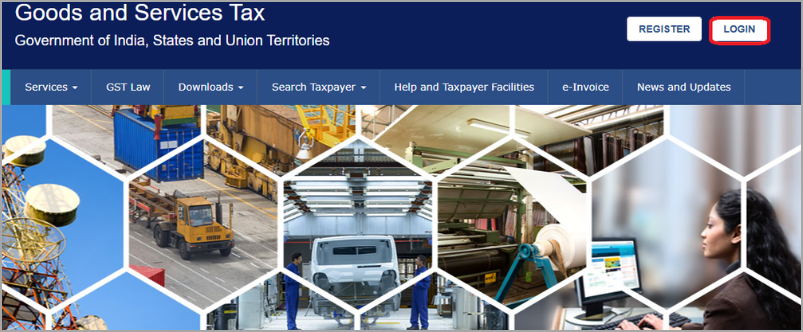
Step 1: First and foremost, you must visit the official GST portal. Once you are on the homepage, you must click on the Login option.
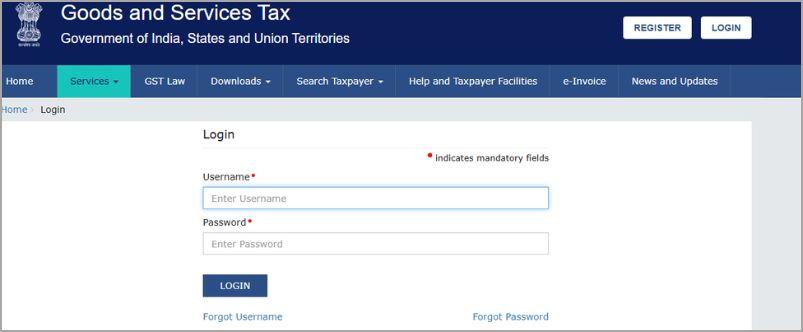
On the next page that appears on your screen, you must enter your Username and Password to log into your account.
Step 2: Now, you need to navigate to Services > Registration > Application for Revocation of Cancellation.
(This option is not available for voluntary cancellations. It is only available for businesses whose registration was cancelled by the proper officers.)

Step 3: Now, you need to select your cancelled GSTIN, enter necessary information and explain the reasons for revocation request.
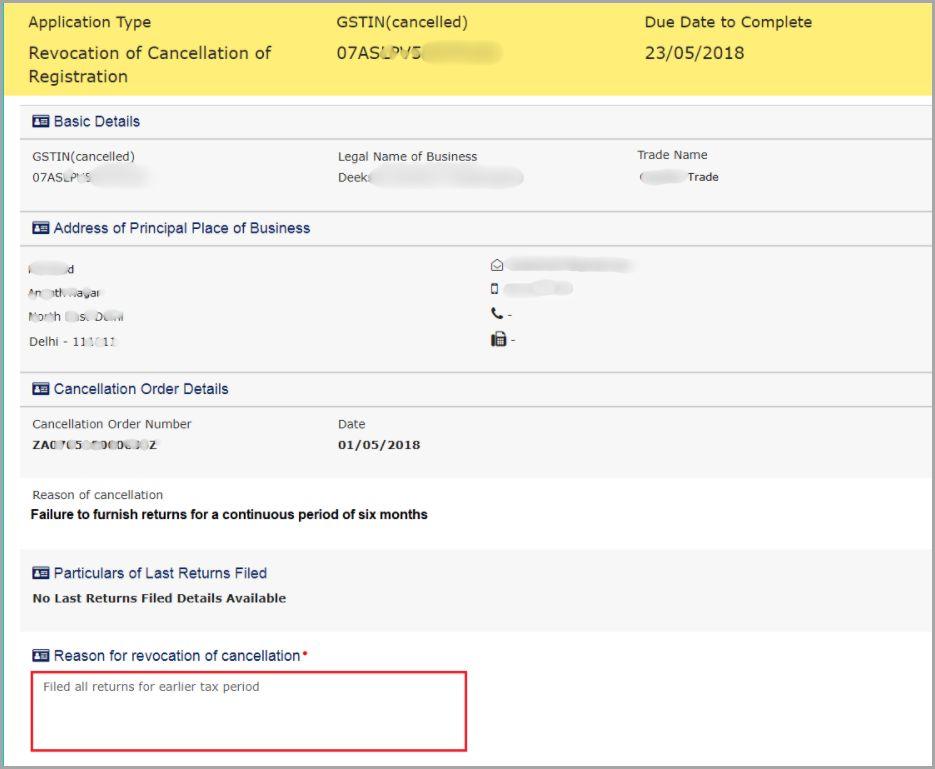
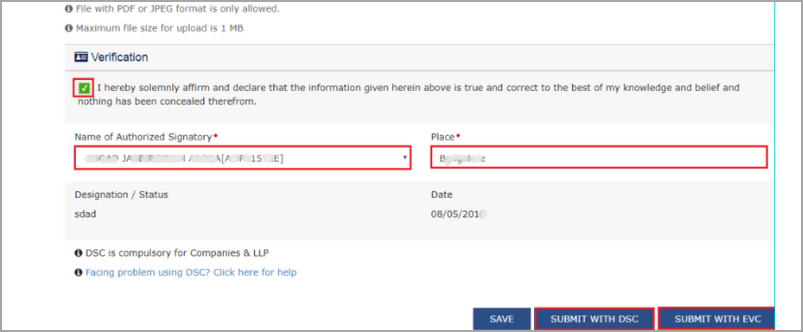
Also, you can attach supporting documents in PDF/JPEG format (their size should not exceed 1mb). Once you update the details, it’s time for you to click on the verification checkbox and then select the authorized signatory and place.
Step 4: Finally, you need to click on ‘Submit with DSC’ or ‘Submit with EVC’ to submit the GST REG-21 form.
After filing the form, a message will be received that the application has been submitted successfully.

Once the GST department receives your application, it’ll review it carefully. If the application meets all the requirements, the department will approve the revocation request. Upon approval, confirmation will be sent via SMS or mail, and the goods and services tax identification number will be reinstated.
Conclusion
If your goods and services tax registration has been cancelled by the proper officer, then it is possible to revoke the cancellation. However, if you cancelled the registration voluntarily, then revocation is not possible. To revoke the cancellation by the proper officer, you must file Form REG-21 by visiting the official GST portal and following the instructions explained in this blog post. For further assistance in GST reactivation, you can reach out to our GST experts at Registrationwala.
Frequently Asked Questions (FAQs)
Q1. Which form do I need to file to revoke cancellation of GST registration?
A. You need to file REG-21 Form to revoke the GST registration’s cancellation.
Q2. Can I file REG-21 if I cancelled my registration voluntarily?
A. No, you cannot file REG-21 if you voluntarily cancel your registration.
Q3. What is the time limit for filing the revocation application for registration via REG-21?
A. For filing the revocation application for registration via REG-21, the time limit is 90 days from date of service of the cancellation order
Q4. Which Act governs the process for revocation of cancellation of GST registration?
A. The Central Goods and Services Tax Act 2017 governs the process for revocation of cancellation of GST registration.
Q5. How to reactivate GST number?
A. You can reactivate the GST number upon filing a reactivation application using REG-21 and obtaining the GST department’s approval.
Q6. How to check GST activation status?
A. Visit the official GST portal, then go to Services and enter “ARN” or “SRN/FRN”. Once done, click on the Search option.
Q7. Can you reactivate GST after it has been suspended?
A. If your GST got cancelled due to non-compliance, it can generally be reactivated by filing Form REG-21.
Q8. What is revocation of GST registration?
A. It refers to the process of restoring GST reg. that was previously cancelled by the proper officer.
-
Published: August 25, 2025
13403 Views